 By Johnathan
 This post contains an affiliate link. If you book through it, I may earn a small commission at no extra cost to you.
Here’s the thing about connectivity in Japan that catches a lot of people off guard: it’s easy to assume your phone will just work the way it does at home, and then you land and realize it doesn’t, not without some kind of plan in place first. I’ve been through this myself more times than I can count, both for my own trips back to Japan and helping every single friend and family member who’s come to visit, figuring out the pocket wifi versus eSIM question before they land.
I travel with family, not solo, and that changes the math completely. Between phones, an iPad, and a laptop, we needed more than one device online at once, and an eSIM only solves that for the one phone it’s installed on. On top of that, an eSIM runs directly off your phone’s own battery and data connection, and after a full day of using your phone as your map, your translator, your restaurant menu reader, and your camera, that battery drain adds up fast. The last thing I wanted was my phone dying at 4pm because it was also working overtime as a hotspot.
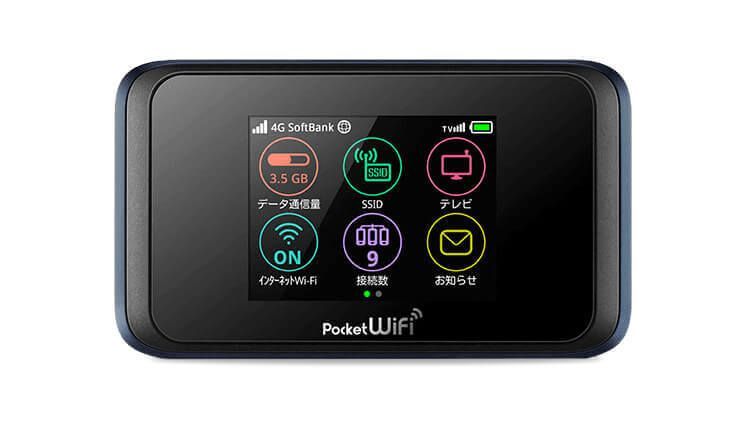
So I went with pocket wifi instead, specifically Japan Wireless, and I can say this plainly: I’ve had zero service issues across my entire time using them. Reliable connection everywhere I actually needed it, no dead zones that caught me off guard, no dropped connection mid-navigation. Every friend and family member I’ve pointed toward them says the exact same thing, no complaints, no issues, it just works.
A few real specifics worth knowing, since a lot of pocket wifi companies bury the details that actually matter. Japan Wireless’s unlimited plans genuinely have no throttling, no hidden daily data cap that quietly slows you down after you cross some number they don’t advertise clearly, which is a real problem with some of the bigger competitors in this space. They offer same-day pickup at major airports if you’re booking last minute, and they’ll price match if you find the same service cheaper somewhere else. Current pricing runs around $5.10 a day, and every rental comes with a full kit, the device itself, a free power bank so you’re not stuck if the router’s own battery runs low mid-day, a charging cable, a travel pouch to keep it all together, and a prepaid, self-addressed return envelope so sending it back is just dropping it in a mailbox, no counter visit required.
What Pocket WiFi Actually Gets You
A pocket wifi is a small, separate device, basically its own little router, that you pick up at the airport (or have delivered to your hotel) and carry with you. It has its own battery, its own SIM, and it creates a wifi network that any device can join, phones, tablets, laptops, doesn’t matter how many, up to whatever the device’s limit is, usually somewhere around 5-10 connected devices at once.
The real advantage here isn’t complicated: your phone’s battery stays your phone’s battery. The wifi device handles the data connection, you just join the network like you would at a coffee shop, and everyone in your group can be online off the same device without draining their own phones doing it.
The honest downside: it’s one more physical thing to carry, charge, and remember to return before you fly home. If you’re traveling solo and only need your phone connected, that extra device is genuinely more hassle than benefit.
A couple of practical things I’ve learned actually using one: pickup is usually a counter right at the airport, sometimes with a pre-booked reservation you show on your phone, and return is often as simple as dropping it in a postage-paid envelope at a mailbox before departure, no counter visit required on the way out. Battery life on most devices runs somewhere around 8-12 hours depending on usage, enough for a full day out, but worth topping it off overnight the same way you’d charge your phone, since running out mid-afternoon with a group of people depending on it is a genuinely bad time to discover you forgot.
What eSIM Actually Gets You
An eSIM is a digital SIM built directly into modern smartphones, no physical card, no separate device. You buy a plan, scan a QR code from the provider, and your phone connects the moment you land, sometimes the moment you install it, depending on the provider’s activation rules.
If it’s just you, or you and one other person each carrying your own phone, this is honestly a great option, and probably simpler than pocket wifi. Ubigi consistently comes up as one of the strongest choices for 2026, it runs on NTT Docomo’s network, which has the widest rural coverage in the country, genuinely useful if your trip goes beyond just Tokyo. Airalo is the more recognized, easier-to-use option for straightforward city travel, though it’s capped at 4G/LTE rather than 5G, and its “unlimited” plans quietly throttle your speed after a certain amount of data each day, something a lot of people don’t realize until they hit it. If you do go with Airalo, use referral code WTE8532 at checkout for $3 off your first purchase.
That throttling detail matters more than it sounds like. Several eSIM providers advertise “unlimited” data that actually slows down significantly after 1-3GB in a single day, fine for maps and messaging, genuinely frustrating if you’re trying to video call home or upload a lot of photos.
What About Free Public WiFi?
You’ll see it everywhere, cafes, stations, convenience stores, and the instinct is to just rely on that instead of paying for anything. I wouldn’t. Here’s why, based on actually trying it.
First, when you search for available networks, you’ll often see a confusing pile of them pop up at once, several with similar names, and it’s not always obvious which one is the real, legitimate free option versus something else entirely. Once you do connect, most of these networks are genuinely time-limited, sometimes as short as an hour, before you’re kicked off and have to sign back in again, re-entering your info or clicking through another agreement screen. Leave it idle for a while without actively using it, and it’ll often drop your connection entirely, same deal, sign in again from scratch. Some locations even cap how many times you’re allowed to log back in during a single day. On top of all that, the actual connection quality is frequently spotty and slow, fine for a quick map check, genuinely frustrating for anything more.
There’s also a real privacy angle worth thinking about. You’re sharing that network with every other stranger connected to it at the same time, and if you take data privacy seriously at all, that’s worth factoring in before you start pulling up anything sensitive, banking apps included.
If you want to actually track down legitimate free wifi spots while you’re out, the map by NTT BP includes a real wifi spot map showing public wifi options available.
My honest take: free public wifi is a fine stopgap, not a real solution. Use the airport’s wifi the moment you land to get yourself sorted, check messages, confirm your pickup details, while you’re picking up your eSIM or pocket wifi, and then stop relying on public networks after that. It’ll save you a real headache.
My Honest Take: Who Should Actually Pick Which
If it’s just you, or a couple each keeping their own phone charged and online, an eSIM is probably the simpler, lighter option, and Ubigi is the one I’d point you toward if you’re going anywhere outside the big cities.
If you’re traveling as a family, with kids on a tablet, someone working off a laptop, or more people than phones you want to individually manage, pocket wifi is genuinely the better call, and it’s not close. One device, one battery to manage that isn’t your phone’s, everyone connected. That’s exactly why I use Japan Wireless every time I go back, and it’s the same thing I’ve told every friend and family member who’s come to visit, get the pocket wifi, don’t overthink it.
Japanese Word to Know: denpa (電波) Pronounced den-pah. It means “signal” or “radio wave,” as in cell signal.
Frequently Asked Questions
Is pocket wifi or eSIM better for Japan?
It depends on how many devices you need connected. Solo travelers or couples with their own phones often do fine with an eSIM. Families or groups needing multiple devices online at once, phones, tablets, laptops, are usually better served by a pocket wifi, since it doesn’t drain any single phone’s battery and connects everything to one device.
Does eSIM drain your phone’s battery faster?
Yes, noticeably. Using your phone as a hotspot or relying on it constantly for data on top of maps, translation, and photos adds up over a full day, which is part of why families managing multiple devices often prefer a separate pocket wifi device instead.
Is Japan Wireless reliable?
In my own experience, yes, consistently, with no service issues across the time I’ve used them, and every friend or family member I’ve recommended them to says the same.
Does Japan Wireless throttle data on unlimited plans?
No, and that’s a real point in their favor, some competitors advertise “unlimited” data that actually slows down significantly after a hidden daily cap. Japan Wireless’s unlimited plans genuinely have no throttling.
How much does Japan Wireless cost?
Pricing runs around $5.10 a day as of this writing, and that includes the device, a free power bank, charging cable, travel pouch, and a prepaid return envelope. Rates can shift, so check current pricing on their site before booking.
What about just buying a physical SIM card instead?
It’s a real third option, but honestly the least convenient of the three for most travelers. You need an unlocked phone, a place to physically swap the SIM (meaning you lose your home number’s SIM while it’s out), and Japan doesn’t have SIM card vending machines everywhere the way some countries do. For most people, pocket wifi or eSIM is simpler.
Can I just rely on free public wifi in Japan instead?
I wouldn’t recommend it as your main plan. It’s genuinely useful as a stopgap right when you land, but expect time limits that log you out repeatedly, confusing overlapping network names, spotty and slow connections, and a shared network with strangers if privacy is a concern for you.
Getting your connectivity sorted is one small piece of planning a Tokyo trip. If you want the rest mapped out too, hotels, daily plans, real recommendations, I put together a free 7-day Tokyo itinerary you can grab.
Have a question about staying connected in Japan? Contact me and I’ll get back to you.